管理版本
入门
可以使用 Stride Launcher 管理引擎的不同版本。
Note
这里提供的说明可作为更新到任意新版 Stride 的通用指南。
版本号方案
版本号遵循 major.minor.patch 的格式。
更改版本
你可以通过点击 Stride versions 下方的某个版本来选择引擎的其他版本。
要更改版本号中的修订号(版本字符串的最后一部分),请点击其旁边的下拉菜单。
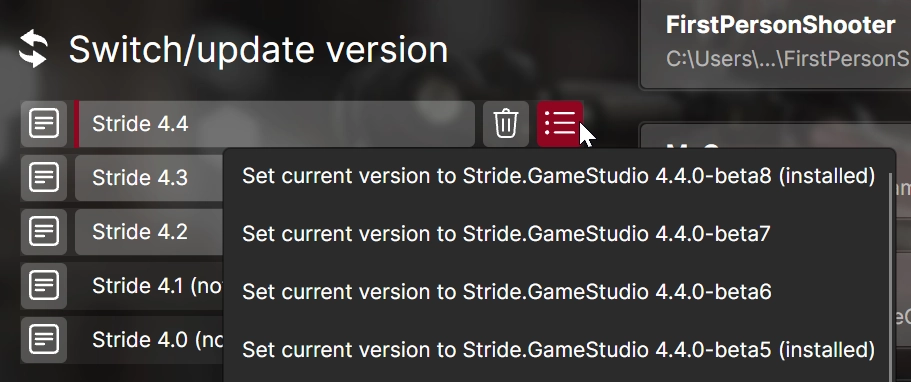
安装版本
要安装指定版本的引擎:
- 选择你要安装的版本(参见更改版本)。
- 点击安装按钮。

卸载版本
要移除已安装的某个引擎版本:
- 选择你要移除的版本(参见更改版本)。
- 点击卸载按钮。

使用 Stride CLI 管理版本
Stride CLI 让你可以直接通过命令行安装、卸载和更新引擎版本。有关安装步骤,请阅读 Stride CLI。
stride sdk available --prerelease # List all available versions, including betas
stride sdk install # Install the latest version
stride sdk update # Update all installed versions to the latest patch.
stride sdk uninstall 4.3 # Unintall Stride 4.3
| Command | Description |
|---|---|
stride sdk install |
Install the latest version of the engine or the resolved project's version located in the current directory. |
stride sdk install VERSION |
Install a specific version of the engine. Version patch number is optional. |
stride sdk available |
List available versions of the engine. |
stride sdk list |
List all installed versions. |
stride sdk update |
Update all installed versions of the engine to the latest patch. |
stride sdk update VERSION |
Update a specific installed version of the engine to the latest patch. Version patch number is optional. |
stride sdk uninstall VERSION |
Uninstall a specific version of the engine. |
Note
For many commands, the patch version can be skipped (e.g. 4.3).
Tip
The CLI will ignore beta versions of the engine, unless you pass the --prerelease flag.