公共属性和字段
初级 程序员
当你在脚本中声明公共属性(public property)或字段(field)时,该属性会出现在 Game Studio 的脚本组件属性中。
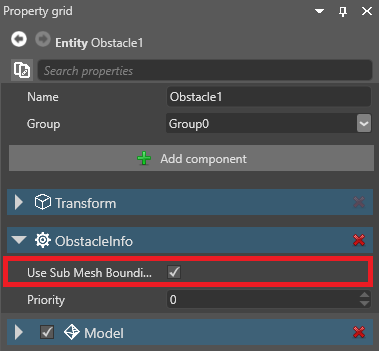
你可以将同一个脚本附加到多个实体上,并在每个实体上设置不同的属性值。
Note
属性和字段必须是可序列化的,才能在 Game Studio 中使用。
添加公共属性或字段
这个脚本有一个公共属性(DelayTimeOut):
public class SampleSyncScript : StartupScript
{
	// 这个公共成员会出现在 Game Studio 中
	public float DelayTimeOut { get; set; }
}
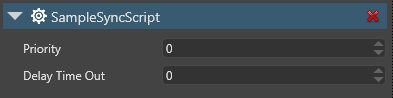
Game Studio 会在脚本组件属性中显示 DelayTimeOut 属性:
Note
一般来说,如果你想在 Game Studio 中显示该属性或字段,getter 和 setter 应该尽可能少做事。例如,它们不应尝试调用方法或访问 Stride 运行时 API。
例如,以下代码会产生问题,因为它试图访问只在运行时可用的 Entity.Components:
public class SampleSyncScript : StartupScript
{
	private float delayTimeOut;
	// 这个公共成员会出现在 Game Studio 中
	public float DelayTimeOut
	{
		get { return delayTimeOut; }
		set
		{
			delayTimeOut = value;
			Entity.Components.Add(new SkyboxComponent());
		}
	}
}
如果你想在属性或字段中包含这样的代码,请将其隐藏,使 Game Studio 不显示它(见下文)。
在属性网格中隐藏属性或字段
如果你不想让 Game Studio 在属性网格中显示某个属性,可以:
- 将你的成员声明为 internal 或 private,或者
- 像下面这样使用 DataMemberIgnore 特性:
// 这个公共属性在 Game Studio 中不可用
[DataMemberIgnore]
public float DelayTimeOut { get; set; }
Game Studio 将不再显示该属性:
![公共属性被 [DataMemberIgnore] 隐藏](media/scripts-in-stride-public-property-with-datamemberignore.png)
添加属性描述
当你在代码中的公共属性上方添加 <userdoc> 注释块时,Game Studio 会将其显示在描述字段中。
///<summary>
/// 这段摘要不会显示在 Game Studio 中
///</summary>
///<userdoc>
/// 这段描述会显示在 Game Studio 中
///</userdoc>
public float DelayTimeOut { get; set; }
启用文档文件生成:
<PropertyGroup>
  <TargetFrameworks>net6.0</TargetFrameworks>
  <DocumentationFile>bin\$(Configuration)\$(TargetFramework)\$(AssemblyName).xml</DocumentationFile>
</PropertyGroup>
Note
Game Studio 只会在每个程序集的构建输出目录中查找。建议使用上面的路径。
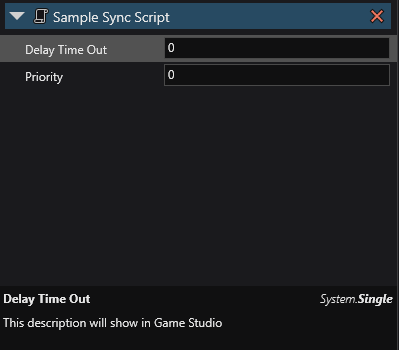
下次重新加载后,Game Studio 应当会显示该文档:
MemberRequiredAttribute
MemberRequiredAttribute 用于指定某个字段或属性在编辑器中是否不能留空。如果该成员没有设置任何值,构建游戏时会记录一条警告或错误。
[Stride.Core.Annotations.MemberRequired(MemberRequiredReportType.Error)] public CharacterComponent MyCharacter;
其他序列化特性
DataMemberRangeAttributeInlinePropertyAttributeItemCanBeNullAttributeItemNotNullAttributeMemberCollectionAttributeDataStyleAttributeDisplayAttribute