资产
入门
资产(Asset)是项目中各种元素(如场景、纹理或音频)的表示形式,可以被脚本或其他资产使用。例如,模型组件使用模型资产。
**资源(Resource)**则是包含实际数据(如图像或音乐)的文件,可供资产使用。
简而言之:
- 资源 —— 原始数据文件(
.png、.wav、.fbx)。 - 资产 —— 游戏中可用的元素。它们可以使用资源文件,并包含额外的属性。
蓝色、绿色和灰色圆点
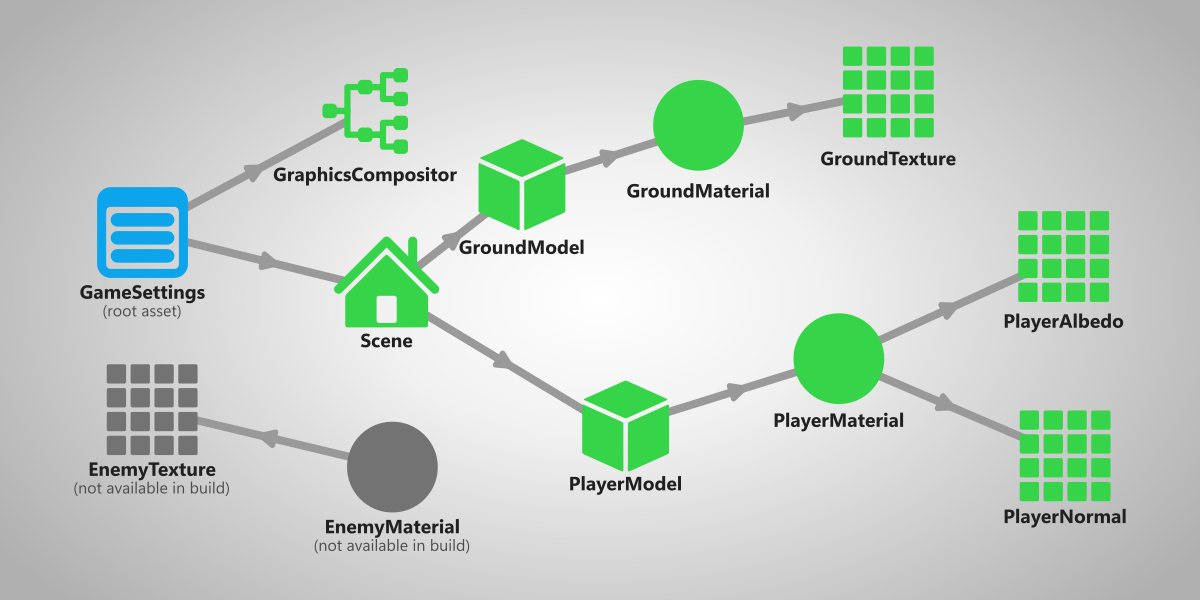
Stride 只编译游戏用到的资产。这意味着,如果一个资产没有被另一个被判定为需要的资产所引用,它就会被忽略。
In the Asset view, you can see a dot in the top left corner of every asset that signifies how it will be compiled.
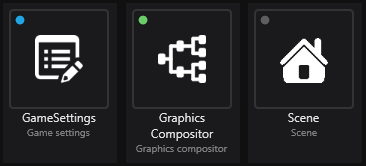
Each color represents something:
- 🔵 Blue (will be compiled) - this asset is marked as root, meaning that it will always be compiled in the game no matter if it's referenced or not.
- 🟢 Green (will be compiled) - this asset is referenced by another asset that is used in the game, meaning that it will be compiled.
- 🟡 Yellow (will be compiled) - this asset will be included in the build, but its contents will be replaced by another asset. For more information, visit Replacement assets.
- ⚫ Gray (won't be compiled) - this asset isn't referenced by any other asset that's used in the game, meaning that it won't be compiled.
有关资产如何编译的更多信息,请参阅资产编译。
资产和资源的位置
在 Game Studio 中,你可以在解决方案资源管理器中选择一个 Assets 文件夹,然后在资产视图中查看资产。
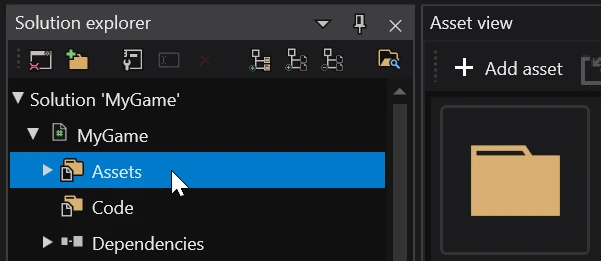
至于资源,则无法在 Game Studio 中查看。你可以打开包含项目的目录,进入项目包的资源文件夹来浏览它们。
更多信息请参阅项目文件结构。